Common errors · Supabase Auth with Lovable, Bolt, Next.js, Vite
Supabase auth: confirmation or magic link redirects to localhost:3000
Cause Site URL in Supabase is still localhost, or your real domain is missing from the Redirect URLs allow list.
Fix Set Site URL to the production domain, add every domain to Redirect URLs, and pass the redirect built from the current origin.
Have it fixed for you, 290 EURSee the fix step by step
Sign-up works locally, then real users click the confirmation email and land on localhost. The link is built from your project settings, not from the page the user signed up on.
Where it breaks
Where to change it in Supabase
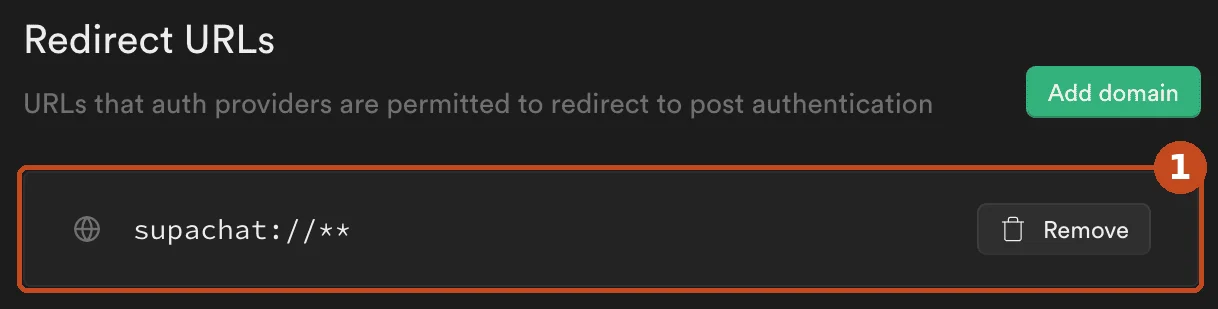
- Redirect URLs (frame 1): add your production domain with a wildcard, for example https://yourapp.com/**, next to your preview domains.
- Site URL, on the same URL Configuration page: replace http://localhost:3000 with https://yourapp.com, then save.

Which case is yours?
- Authentication > URL Configuration > Site URL is still http://localhost:3000, so it is used as the default redirect.
- Or you pass emailRedirectTo / redirectTo with your real domain but that domain is not in the Redirect URLs allow list, so Supabase silently falls back to the Site URL.
The fix, step by step
- Set Site URL to your production domain, for example https://app.example.com.
- Add every domain you use to Redirect URLs, including preview deployments with a wildcard: https://app.example.com/**, https://*-yourteam.vercel.app/**, http://localhost:3000/**.
- Pass the redirect explicitly from the page, built from the current origin.
await supabase.auth.signUp({ email, password, options: { emailRedirectTo: `${window.location.origin}/auth/callback` }, }); - On the callback route, exchange the code for a session (PKCE flow) before redirecting the user to the app.
const { error } = await supabase.auth.exchangeCodeForSession(code);
How to check it is fixed
Sign up with a new address from the production site: the email link opens your domain and the user is signed in.
Delivery example for this error
- await supabase.auth.signUp({ email, password })+ options: { emailRedirectTo:+ `${origin}/auth/callback` }- Root cause: Site URL in Supabase is still localhost, or your real domain is missing from the Redirect URLs allow list.
- Change made: Set Site URL to the production domain, add every domain to Redirect URLs, and pass the redirect built from the current origin.
- Sign up with a new address from the production site: the email link opens your domain and the user is signed in.
Illustrative: the real diff is written against your repository. Full sample report
Still stuck on your own code?
Send the repository and the exact error. Fix: 290 EUR all taxes included, delivered within 72 hours, refunded if not resolved.
Not sure it is this error? Ask for a free written diagnosis, no card needed.